Agents, Harnesses, Skills, and Tools
Version 1.1.0 · 18 pages · PDF · Word
Which words this guide uses
Section titled “Which words this guide uses”Claude Code, Codex, GitHub Copilot, Cursor and Cowork are all built from the same six parts: a model, a harness, agents, skills, tools and MCP servers. Each product names these parts a little differently, and some words get used for more than one part.
This guide uses the generally accepted name for each part, and uses each name for one part only. Marketing terms and terms that apply to more than one concept aren’t used, to keep each term clear and consistent throughout the document.
| Part | Other uses of the word, and what this guide says instead | |
|---|---|---|
| Agent | “Agent” for several different things | People say agent for the whole system, the main loop of a harness, a sub-agent and the file that defines one. This guide always says which: the main agent, a sub-agent or an agent definition. |
| Harness | Product names | Claude Code and GitHub Copilot CLI are products. In this guide they’re examples of a harness, and Claude Opus 5.5 is an example of a model. |
| Tool | “Tool” for one kind of tool | Some documents mean only built-in tools, or only the tools an MCP server exposes. In this guide, tool covers all three kinds, and the kind is named when it matters. |
| MCP server | “Connector” | Claude apps call an MCP server that you add through settings a Connector. This guide calls it an MCP server. |
| Skill | “Slash command” | Slash command covers both skills and built-in commands like /compact. This guide says skill for a skill, and uses a built-in command’s own name. |
The model and the context window
Section titled “The model and the context window”The model only knows what’s in its context window. The model has no memory between calls, so on every call the harness sends the whole context again, and the model reads all of it before replying. If something isn’t in the context window, the model can’t see it.
The context window has a fixed size, and everything in the window takes up room. The fuller the window gets, the slower and more expensive each call is, and the more likely the model is to miss details. When the window fills up, the harness trims or summarizes older content to make room.
What’s in the main agent’s context window
Section titled “What’s in the main agent’s context window”| When it’s there | Where it comes from | |
|---|---|---|
| System prompt | Every call | The harness |
| Instructions file | Every call | You or your team, in a file such as CLAUDE.md or AGENTS.md |
| Skill names and descriptions | Every call | The top of each SKILL.md |
| The rest of a skill | From the skill’s first use | SKILL.md, plus any files a step reads |
| Sub-agent names and descriptions | Every call | Each agent definition |
| Tool definitions | Every call, unless loaded on demand | The harness and each MCP server |
| Your messages and the model’s replies | From when they’re written | You and the model |
| Tool calls | From when the model writes them | The model |
| Tool results | From when the tool returns | The tool that ran |
Everything stays in the window until the session ends or the harness trims it. The body of an agent definition isn’t in the main agent’s context window. The body becomes the sub-agent’s system prompt, in the sub-agent’s own window.
How the parts fit
Section titled “How the parts fit”The harness is the program you start. On each turn the harness sends the model its context, runs the tool calls your permissions allow, and adds the results to the context. The loop repeats until the model replies without a tool call.
In this guide, the main agent is the model running in the harness’s loop for your session. The main agent can start sub-agents, which are separate loops set up from agent definition files, each with its own context window. A sub-agent works on one task and sends a summary back.
Skills and sub-agents don’t act on their own. Every action is a tool call that the harness runs, whether the tool is built into the harness, exposed by an MCP server, or a script or CLI run through the shell tool.
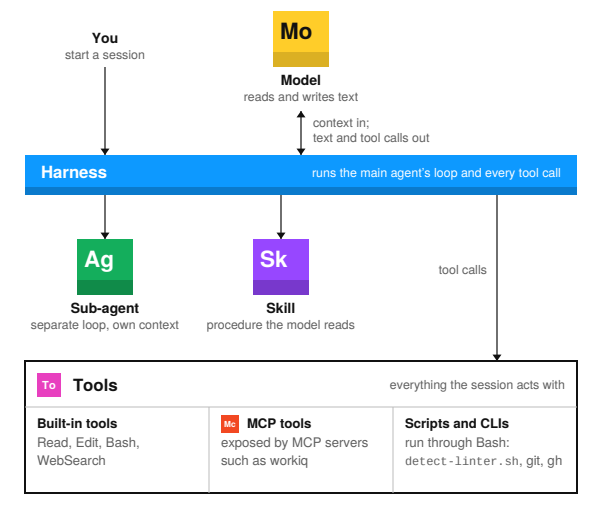
How the entries are laid out
Section titled “How the entries are laid out”Each of the six parts has its own page, and every page is laid out the same way so you can compare one part with another. In each row, the bold text is the short answer and the text after the bold adds detail. The rows answer these questions:
| Row | Question |
|---|---|
| Identify by | How do I recognize the part on screen or in a project folder? |
| What | What is the part, and what job does the part do in a session? |
| So what | Why does the difference matter, and where should I look when the part doesn’t behave as expected? |
| Started by | Who or what starts the part? |
| In context | When does the part take up room in the context window? |
| Lasts | How long does one use of the part last: one call, one task or the whole session? |
| Runs on | Where does the part’s work happen: a provider’s servers, your machine, a sandbox or inside the harness? |
| Can / Cannot | What can the part do on its own, and what does the part need another part for? |
| In the diagram | Where is the part in the team’s harness diagram? The team diagram isn’t the simplified diagram on page 4. Colors match the team diagram, except Skill, which is teal there and purple here. |
| Confused with | Which part is most often mixed up with this one, and how do I tell the two apart? |
01 Model
Section titled “01 Model”| Field | Text |
|---|---|
| Identify by | A name and version, such as Claude Opus 5.5 or GPT-6 Astra. |
| What | A model turns text into text. The model has no memory between calls, so the harness sends the whole context again each time. A model can’t open a file or run a command. When the model needs to act, the model writes a tool call and stops. |
| So what | The model you pick sets the quality, speed and price of each step. Permissions are set in the harness, not by the model. When answers are poor, check what was in the context window before you switch models. |
Field marks
Section titled “Field marks”| Field | Short answer | Detail |
|---|---|---|
| Started by | The harness | On each step of the loop, through the provider’s API. |
| In context | Reads the context | The model only sees what the harness sends on that call. |
| Lasts | One call | Usually seconds, sometimes a few minutes. |
| Runs on | The provider’s servers | Open-weight models can also run on a local machine. |
| Can | Write | Code, prose and tool calls, including which tool to call next. |
| Cannot | Act or remember | Every action goes through a tool call. Nothing carries over between calls unless the harness sends it again. |
| In the diagram | Yellow box | Claude Opus 5.5, GPT-6 Astra, Gemini 3.8 Flash, MAI-Code-1.1-Flash and others. |
Confused with: Agent
Section titled “Confused with: Agent”A model only writes text, including tool calls. An agent is a model that a harness runs in a loop with tools, which is why an agent can act.
02 Harness
Section titled “02 Harness”| Field | Text |
|---|---|
| Identify by | The program you start, such as a CLI, an IDE panel or a desktop app. |
| What | A harness is the program that runs the model in a loop. On each turn the harness builds the context, sends the context to the model, runs the tool calls the model writes, and adds the results to the context. The loop ends when the model replies without a tool call. The harness also enforces permissions, manages the context window, loads skills and starts sub-agents. |
| So what | A lot of behavior that gets blamed on the model is a harness setting, such as which commands run without asking, what’s kept when a long session gets trimmed, and which files load at startup. You can read and change these settings. The same model can behave differently in two different harnesses. |
Field marks
Section titled “Field marks”| Field | Short answer | Detail |
|---|---|---|
| Started by | You | When you open a session. |
| In context | Writes the context | The harness writes the system prompt and decides what else goes into each call. |
| Lasts | One session | Some harnesses can resume a saved session. |
| Runs on | Your machine, a sandbox or CI | Wherever you launched the session. |
| Can | Act, within your permissions | Read and write files, run commands and use the network. |
| Cannot | Decide what to do next | The model picks each next step, and the harness carries the step out. |
| In the diagram | Blue bar | Other harnesses: Claude Code, Codex CLI, GitHub Copilot CLI, Cursor, Cowork, Claude Agent SDK. |
Confused with: Agent
Section titled “Confused with: Agent”A harness is a program you install. The main agent is the model running in the harness’s loop, and a sub-agent is a separate loop the harness starts from an agent definition.
03 Agent
Section titled “03 Agent”| Field | Text |
|---|---|
| Identify by | An agent definition file, such as .claude/agents/reviewer.md in Claude Code or a .agent.md file in GitHub Copilot. |
| What | An agent is a model running in a loop with tools. The main agent is the loop the harness runs for your session. A sub-agent is a separate loop that the main agent starts for one task, with its own instructions, tools and context window. An agent definition is the file that sets up a sub-agent. |
| So what | Sub-agents keep side work out of the main agent’s context window. A long search or a review runs in the sub-agent’s context, and only the summary comes back to the main agent. Limiting a sub-agent’s tools limits what that sub-agent can change. |
Field marks
Section titled “Field marks”| Field | Short answer | Detail |
|---|---|---|
| Started by | The main agent, or you | When a task matches the sub-agent’s description, or when you ask for the sub-agent by name. |
| In context | Description in the main agent, body in the sub-agent | The main agent sees each sub-agent’s name and description. The rest becomes the sub-agent’s system prompt. |
| Lasts | One task | A sub-agent’s context is thrown away when the sub-agent returns, unless the harness supports resuming. |
| Runs on | Inside the harness | Each sub-agent runs as a separate loop. |
| Can | Work in parallel | Several sub-agents can run at once, each limited to the tools in its definition. |
| Cannot | Use tools outside its definition | In most harnesses, a sub-agent also can’t see the main agent’s conversation. |
| In the diagram | Green box | Scribe, Podkit, Code-review. Claude Code keeps agent definitions in .claude/agents/, and GitHub Copilot calls them custom agents. |
Confused with: Instructions file
Section titled “Confused with: Instructions file”AGENTS.md is an instructions file that the main agent loads every session. An agent definition sets up a sub-agent, and the body only loads when that sub-agent starts.
04 Skill
Section titled “04 Skill”| Field | Text |
|---|---|
| Identify by | A folder with a SKILL.md file, often with scripts/ and references/ beside it. |
| What | A skill is a written procedure kept in a folder. SKILL.md starts with a name and a description, followed by the steps. At startup the harness loads only the name and description of each skill. The rest loads when the model matches the description to your request, or when you call the skill by name, such as /code-review-cycle. |
| So what | A skill turns the way a team does a task into a file that can be reviewed, versioned and shared. Since only descriptions load at startup, a harness can hold many skills without using much context. The description is what triggers a skill, so when a skill doesn’t run, check the description first. |
Field marks
Section titled “Field marks”| Field | Short answer | Detail |
|---|---|---|
| Started by | The model or you | The model starts a skill when the description matches the task. You start a skill by typing its name. |
| In context | Description always, the rest when used | Scripts and reference files only enter the context when a step reads or runs them. |
| Lasts | The rest of the session | When the context is compacted, the harness may keep only part of the skill. |
| Runs on | In the model’s context | The model reads the skill and follows the steps. Scripts run through the shell tool. |
| Can | Give the model a procedure | Bundle scripts and reference files, and tell the model which tools to call and sub-agents to start. |
| Cannot | Add tools | A skill that runs a script still needs the shell tool. A skill that reads Teams still needs a tool that can reach Teams. |
| In the diagram | Teal box, purple here | code-review-cycle: SKILL.md, scripts/detect-linter.sh, references/agent-prompts.md. Also doctor, batch, debug, loop, claude-api. |
Confused with: Tool
Section titled “Confused with: Tool”A skill is text the model reads. The scripts inside a skill are tools, and the scripts run through the shell tool.
05 Tool
Section titled “05 Tool”| Field | Text |
|---|---|
| Identify by | Anything the model can call to act: a built-in tool such as Bash, an MCP tool, or a script or CLI run through the shell. |
| What | A tool is anything the model uses to act. Every tool is used the same way: the model writes a tool call, and the harness checks permissions, runs the call and adds the result to the context. Built-in tools come with the harness, MCP tools come from connected servers, and scripts and CLIs run through the shell tool. |
| So what | The model can only work with systems that one of its tools connects to. Permissions apply to each call. When you ask for a new tool, say which kind you need, because each kind is added in a different place: harness settings, MCP settings or the repo. |
Field marks
Section titled “Field marks”| Field | Short answer | Detail |
|---|---|---|
| Started by | The model asks, the harness runs | The harness checks permissions before every call. |
| In context | Definitions, calls and results | Built-in and MCP tools add a definition on every call, unless loaded on demand. Every kind adds the call the model writes and the result that comes back. |
| Lasts | One call | |
| Runs on | Depends on the kind | Built-in tools run inside the harness, MCP tools in the server, and scripts and CLIs in your shell or sandbox. |
| Can | Act outside the conversation | Read and change files, run programs and query services. |
| Cannot | Decide when to run | The model decides, based on a tool definition or on a skill or instructions file that names the command. |
| In the diagram | No box | Bash runs scripts/detect-linter.sh, and workiq exposes MCP tools for Microsoft 365 data. |
Confused with: MCP server
Section titled “Confused with: MCP server”An MCP server is a program. The tools the server exposes are one kind of tool.
06 MCP server
Section titled “06 MCP server”| Field | Text |
|---|---|
| Identify by | An entry in the harness’s MCP settings, with either a start command or a URL. |
| What | An MCP server is a separate program that exposes tools over the Model Context Protocol. Some servers also expose resources and prompts. The harness connects to the server when the session starts, asks for the server’s list of tools, and passes the model’s tool calls to the server. A local server runs as a process on your machine, and a remote server runs at a URL. |
| So what | One MCP server works with any harness that supports MCP. The team that owns a system can write the server once, and Claude Code, Codex, Copilot and Cowork can all use it. The server holds the credentials and decides what data to return, so access control for that system belongs in the server, not in a prompt. |
Field marks
Section titled “Field marks”| Field | Short answer | Detail |
|---|---|---|
| Started by | The harness | The harness connects when the session starts. |
| In context | Definitions, calls and results | Tool definitions, unless loaded on demand, which Claude Code does by default. Each call and response also stays in the context. |
| Lasts | The session, or always on | A local server starts and stops with the session. A remote server runs on its own. |
| Runs on | A local process or a URL | Local servers use stdio, and remote servers use HTTP. |
| Can | Reach other systems | Using the server’s own credentials. |
| Cannot | Act on its own | Nothing happens until the model calls one of the server’s tools. |
| In the diagram | Orange box | workiq. In Claude apps, MCP servers added through settings appear as Connectors. |
Confused with: Tool
Section titled “Confused with: Tool”An MCP server is a program. The server’s tools are one of the three kinds of tool, alongside built-in tools and scripts.
What “tool” means
Section titled “What “tool” means”A tool is anything the model uses to act outside the conversation, such as reading or changing a file, running a program or querying a service. There are three kinds of tool: built-in tools, MCP tools, and scripts or CLIs. The model uses all three the same way, through a tool call.
The tool call
Section titled “The tool call”The model can’t act on its own. When the model needs to read a file or run a command, the model writes a tool call: a tool name plus arguments, such as Bash with the command git diff. The harness checks the call against your permissions, runs the call, and adds the result to the context for the model’s next call.
Every action in a session goes through a tool call. In Claude Code, even loading a skill or starting a sub-agent is a tool call.
Three kinds of tool
Section titled “Three kinds of tool”| Where the tool comes from | Examples | |
|---|---|---|
| Built-in tool | Comes with the harness. The harness puts a definition of each built-in tool in the context, usually on every call. | Read, Edit, Bash, WebSearch |
| MCP tool | Comes from a connected MCP server. The harness passes the call to the server and adds the server’s response to the context. | workiq tools for Microsoft 365 data |
| Script or CLI | Runs through the shell tool and has no definition of its own. The command comes from a skill, an instructions file or what the model already knows. | detect-linter.sh, git, gh, az, npm test |
How each kind of tool is called
Section titled “How each kind of tool is called”The diagram follows one call of each kind. The exchange is the same every time. Only the place where the work happens changes.
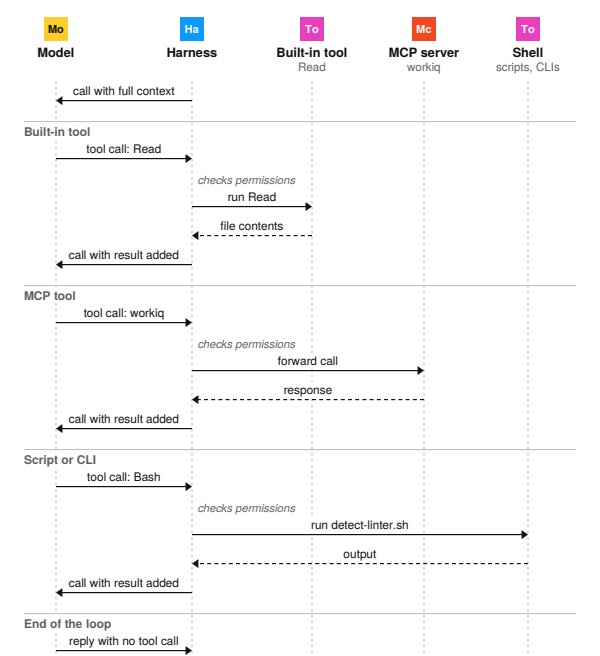
Solid arrows are requests and dashed arrows are results. Each “call” from the harness to the model sends the whole context again, now with the latest tool call and result in it. The model never talks to a tool directly. The harness runs every call.
Working with tools
Section titled “Working with tools”What takes up room in the context window
Section titled “What takes up room in the context window”| Topic | Short answer | Detail |
|---|---|---|
| Tool definitions | Sent on every call, unless loaded on demand | Each built-in and MCP tool has a definition: a name, a description and its arguments. Claude Code loads MCP tool definitions on demand by default. Scripts and CLIs have no definition. |
| Tool calls | Written by the model, kept in the conversation | A tool call is part of the model’s reply, so the call is sent again on every later call. Most calls are short, but a call that writes a file carries the whole file. |
| Tool results | Often the largest thing in the context | A large file, long command output or a big MCP response can take more room than everything else combined. The result stays until the harness trims the context. |
| Kind of tool | Only the definition differs | A call and its result take the same room whether the tool is built in, from an MCP server, or a script. |
Adding and choosing tools
Section titled “Adding and choosing tools”| Topic | Short answer | Detail |
|---|---|---|
| Reach | The model only works with systems a tool connects to | If no tool can read your Teams messages, the model can’t see them, whichever model you pick and however you word the prompt. You need to add a tool. |
| Permissions | Checked on every call | The harness can allow, block or ask you about each tool call. For the shell tool, permission rules match command patterns. |
| Choosing a kind | Most systems can be reached either way | A script or CLI has no definition and is versioned with the repo, but the model needs a skill or instructions file to know the command. An MCP server describes its tools, holds its own credentials and works in any harness that supports MCP. |
| Asking for one | Say which kind you need | A built-in tool is a harness setting, an MCP tool needs an MCP server entry, and a script lives in the repo or a skill folder. Each kind has a different owner. |
One request, start to finish
Section titled “One request, start to finish”Here’s what happens when you ask a session to review your changes before you commit, using the code-review-cycle skill from the diagram. The last two columns show the part used at each step and what’s added to the main agent’s context.
| Who | What happens | Part used | Added to context | |
|---|---|---|---|---|
| 1 | You | Type “review my changes before I commit.” | Your message | |
| 2 | Harness | Builds the context and calls the model. | System prompt, instructions file, skill and sub-agent descriptions, tool definitions | |
| 3 | Model | Matches your request to the code-review-cycle description and writes a tool call to load the skill. | Skill | The tool call |
| 4 | Harness | Reads SKILL.md and calls the model again. | Skill | The rest of SKILL.md |
| 5 | Model | Writes a Bash tool call to run git diff and the skill’s scripts/detect-linter.sh. | Tool | The tool call |
| 6 | Harness | Checks permissions, runs both commands in the shell and calls the model again. | Tool | The diff and the linter output |
| 7 | Model | Writes a Read tool call for the skill’s prompts file, references/agent-prompts.md. | Tool, Skill | The tool call, then the prompts file |
| 8 | Model | Writes tool calls to start three review sub-agents, one prompt each. | Sub-agent | The tool calls |
| 9 | Sub-agents | Each sub-agent reviews the diff in its own context window and returns findings. | Sub-agent | Three summaries of findings |
| 10 | Model | Writes the combined review with no tool call, so the loop ends. | The review |
Steps 3, 5, 7 and 8 are tool calls. The main agent calls the model five times, and each review sub-agent makes its own calls on top of that. Every call sends the whole context again, so the context grows at each step. The sub-agents’ own work stays in their context windows, and only their summaries reach the main agent.
Side by side
Section titled “Side by side”| Started by | Lasts | Runs on | |
|---|---|---|---|
| Model | The harness | One call | The provider’s servers |
| Harness | You | One session | Your machine, a sandbox or CI |
| Sub-agent | The main agent, or you | One task | Inside the harness |
| Skill | The model or you | The rest of the session | In the model’s context |
| Tool | The model asks, the harness runs | One call | The harness, an MCP server or the shell |
| MCP server | The harness, at startup | The session, or always on | A local process or a URL |
| In context | Defined in | |
|---|---|---|
| Model | Reads the context | A setting in the harness |
| Harness | Writes the context | The installed program and its settings |
| Sub-agent | Description in the main agent, body in its own context | An agent definition file |
| Skill | Description always, the rest when used | A folder with SKILL.md |
| Tool | Definitions, calls and results | The harness, an MCP server or a script file |
| MCP server | Definitions, calls and results | An entry in the MCP settings |
Agent definitions, skills, instructions files and MCP settings are all text files, so you can review and version them like the rest of your code.
Telling them apart
Section titled “Telling them apart”| Question | Answer |
|---|---|
| Model or agent? | A model only writes text. An agent is a model that a harness runs in a loop with tools, which is why an agent can act. |
| Main agent or sub-agent? | The main agent is the loop for your session. A sub-agent is a separate loop the main agent starts for one task, and only the sub-agent’s summary comes back. |
| Agent definition or AGENTS.md? | An agent definition sets up a sub-agent. AGENTS.md is an instructions file that the main agent loads every session. |
| Sub-agent or skill? | A sub-agent gets its own context window and returns a result. A skill loads into the context you’re already in. |
| Skill or tool? | A skill is instructions the model reads. A tool is something the harness runs. |
| Tool or MCP server? | A tool is what the model calls. An MCP server is a program that exposes some tools. |
| Script or tool? | A script is one kind of tool. The model runs a script through the shell tool, so a script doesn’t need a definition of its own. |
Other terms you’ll see
Section titled “Other terms you’ll see”These terms relate to the six parts, but none of them is a separate part.
| Term | Meaning |
|---|---|
| Instructions file | Text the harness loads into every session for a project or user, such as CLAUDE.md, AGENTS.md or copilot-instructions.md. Use an instructions file for facts that always apply. |
| Plugin | A package that installs skills, agent definitions, MCP servers and hooks together. A plugin doesn’t add a new kind of part. |
| Hook | A script the harness runs on an event, such as before a tool call or after an edit. The model doesn’t decide when a hook runs. |
| Connector | What Claude apps call an MCP server added through the Connectors settings, usually a remote one. |
| Slash command | Typing /name to run a built-in command or, in several harnesses, a skill. |
Sources
Section titled “Sources”The facts in this guide were checked against these pages in October 2026. Harnesses change often, so check the current documentation before you rely on a specific behavior.
| Source | Address |
|---|---|
| Claude Code: skills | code.claude.com/docs/en/skills |
| Claude Code: sub-agents | code.claude.com/docs/en/sub-agents |
| Claude Code: MCP | code.claude.com/docs/en/mcp |
| Claude Code: tools reference | code.claude.com/docs/en/tools-reference |
| Model Context Protocol specification | modelcontextprotocol.io/specification |
| Agent Skills specification | agentskills.io/specification |
| GitHub Copilot: custom agents configuration | docs.github.com/en/copilot/reference/custom-agents-configuration |
| Codex: skills | github.com/openai/codex/blob/main/docs/skills.md |
| Work IQ MCP overview | learn.microsoft.com/microsoft-365/copilot/extensibility/work-iq/mcp/overview |
| Claude Connectors directory | claude.com/docs/connectors/directory |
A person writes and reviews every guide. AI does the grunt work.