Context Windows
Draft · Version 0.3.0 · 7 pages · PDF · Word
What is the context window?
Section titled “What is the context window?”The context window is everything the model can see on one call. It holds the instructions and tool descriptions the harness loads, your conversation, and every file and command output the agent has read. The window has a fixed size, so a long session fills it.
An Accidental Guide to: Agents, Harnesses, Skills, and Tools covers the basics and lists what the window holds. These four ideas explain how the window fills up and how you keep room for the work.
| Term | Meaning |
|---|---|
| Token | A short piece of text used to count the window’s size and usage. |
| Startup context | What the harness loads before your first message. |
| Compaction | Replacing older conversation with a summary when the window is nearly full. |
| New session | An empty conversation that starts with only the startup context. |
What takes up room?
Section titled “What takes up room?”The startup context loads before you type your first message and stays in the window for the whole session. The conversation grows with every message you exchange and every file and command output the agent reads. Compaction replaces the conversation with a short summary. A new session has only the startup context. The sizes in the picture are examples.
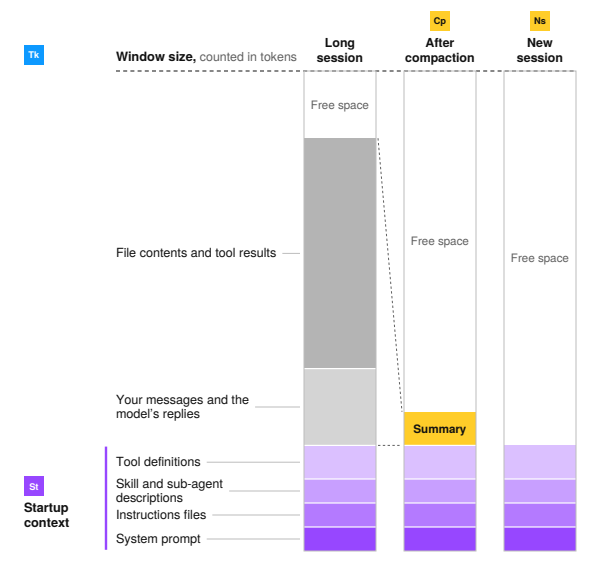
01 Token
Section titled “01 Token”| Field | Text |
|---|---|
| Identify by | A window size, usage count or price stated in tokens. |
| What | A token is a short piece of text. Window sizes, usage and prices are all counted in tokens. |
| So what | The whole window is sent on every call. A large file or log costs its tokens again on every later call. |
Field marks
Section titled “Field marks”| Field | Short answer |
|---|---|
| Controlled by | The model you pick |
| Cannot | Be counted from words |
Confused with: Word
Section titled “Confused with: Word”A short, common word is often one token. A long or rare word can take several.
02 Startup context
Section titled “02 Startup context”| Field | Text |
|---|---|
| Identify by | Content in the window before your first message. |
| What | Startup context is what the harness loads first. That’s the system prompt, instructions files, skill and sub-agent descriptions, and tool definitions. |
| So what | Startup context is sent on every call. Long instructions files and many MCP servers take room before you start. |
Field marks
Section titled “Field marks”| Field | Short answer |
|---|---|
| Controlled by | You and the harness |
| Cannot | Hold every procedure cheaply |
Confused with: Memory
Section titled “Confused with: Memory”Harness memory is a file of notes loaded with the startup context. The model keeps nothing between calls.
03 Compaction
Section titled “03 Compaction”| Field | Text |
|---|---|
| Identify by | A message saying the conversation was compacted. |
| What | Compaction swaps older conversation for a summary. GitHub Copilot CLI does it at about 80 percent full, as of October 2026. |
| So what | Compaction can lose early instructions and exact output. Rules that must last belong in an instructions file. |
Field marks
Section titled “Field marks”| Field | Short answer |
|---|---|
| Controlled by | The harness and you |
| Cannot | Bring lost detail back |
Confused with: Trimming
Section titled “Confused with: Trimming”Trimming drops old content without a summary. Some harnesses trim before they compact.
04 New session
Section titled “04 New session”| Field | Text |
|---|---|
| Identify by | An empty conversation after /clear, /new or opening a session. |
| What | A new session starts with only the startup context. Only content saved in files carries over. |
| So what | A fresh window has room for a new task. Have the agent save its plan and progress to a file first. |
Field marks
Section titled “Field marks”| Field | Short answer |
|---|---|
| Controlled by | You |
| Cannot | Recall the old conversation |
Confused with: Compaction
Section titled “Confused with: Compaction”Compaction keeps a summary in the same session. A new session keeps only files.
What keeps the window useful?
Section titled “What keeps the window useful?”A few habits keep the window small and on topic, so the model can find what matters.
| Habit | Why it helps |
|---|---|
| Start fresh for unrelated work | A new session gives the next task an empty conversation. |
| Save the plan and progress | A file carries what matters into the next session. |
| Send long work to sub-agents | Searches, test runs and log reading stay in separate windows. Only summaries return. |
| Read only what you need | Ask for one function or only the failing tests. |
| Keep instructions files short | Startup context is sent on every call. Move specific procedures into skills. |
| Compact at a natural break | When one part of the work is done, run /compact and say what to keep. |
Sources
Section titled “Sources”These public sources were checked on 22 October 2026, and harnesses change often.
| Source | Date | Address |
|---|---|---|
| Anthropic, Claude Code: Explore the context window | code.claude.com/docs/en/context-window | |
| Anthropic, Claude Code: How Claude Code works | code.claude.com/docs/en/how-claude-code-works | |
| Anthropic, Claude Code: Manage costs effectively | code.claude.com/docs/en/costs | |
| Anthropic, Context windows | platform.claude.com/docs/en/build-with-claude/context-windows | |
| Anthropic, Effective context engineering for AI agents | anthropic.com/engineering/effective-context-engineering-for-ai-agents | |
| GitHub, About context management | docs.github.com/en/copilot/concepts/prompting-and-context/context-management | |
| OpenAI, Codex commands | learn.chatgpt.com/docs/developer-commands | |
| Chroma, Context Rot | trychroma.com/research/context-rot | |
| HumanLayer, Getting AI to Work in Complex Codebases | github.com/humanlayer/advanced-context-engineering-for-coding-agents |
A person writes and reviews every guide. AI does the grunt work.