Agent Skills
Draft · Version 0.3.0 · 9 pages · PDF · Word
What’s in a skill?
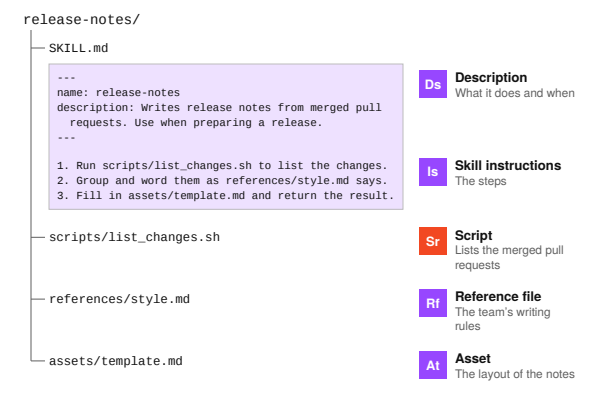
Section titled “What’s in a skill?”It’s easy to think of a skill as one Markdown file. A skill is a folder, and next to SKILL.md it can hold scripts the agent runs, reference files it reads when a step needs them, and assets such as templates.
An Accidental Guide to: Agents, Harnesses, Skills, and Tools covers the basics. The harness loads each part of the folder only when a step needs it, so a skill can carry a lot without filling the context window.
| Term | Meaning |
|---|---|
| Description | The name and description at the top of SKILL.md. |
| Skill instructions | The steps in SKILL.md. |
| Script | Code the agent runs for a step. |
| Reference file | Detail the agent reads only when a step needs it. |
| Asset | A file used in what the skill makes, such as a template. |
How do the parts fit together?
Section titled “How do the parts fit together?”---name: release-notesdescription: Writes release notes from merged pull requests. Use when preparing a release.---1. Run scripts/list_changes.sh to list the changes.2. Group and word them as references/style.md says.3. Fill in assets/template.md and return the result.| Part | File | Caption |
|---|---|---|
| Description | SKILL.md, top | What it does and when |
| Skill instructions | SKILL.md, body | The steps |
| Script | scripts/list_changes.sh | Lists the merged pull requests |
| Reference file | references/style.md | The team’s writing rules |
| Asset | assets/template.md | The layout of the notes |
SKILL.md is the only file a skill needs. The other folders are optional, and a step names the file it uses.
What’s in the context window, and when?
Section titled “What’s in the context window, and when?”The harness loads a skill in stages, as each step needs it. The Agent Skills standard calls this progressive disclosure.
| When | Adds | Label |
|---|---|---|
| Session starts | Description | Every skill’s name and description |
| Your request matches | Skill instructions | The rest of SKILL.md |
| A step runs the script | Script | Only what the script prints |
| A step needs the rules | Reference file | references/style.md |
| A step fills in the template | Asset | assets/template.md |
The script’s code and any file no step opens never enter the context window. What does load stays for the rest of the session.
01 Description
Section titled “01 Description”| Field | Text |
|---|---|
| Identify by | The name and description at the top of SKILL.md. |
| What | A description says what the skill does and when to use it. The agent picks a skill by matching your request to its description. |
| So what | Name the task and the words people use for it. Some harnesses shorten long descriptions, so put the main use first. |
Field marks
Section titled “Field marks”| Field | Short answer |
|---|---|
| In context | From session start |
Confused with: Skill instructions
Section titled “Confused with: Skill instructions”The description decides whether the skill is used. The skill instructions say what to do next.
02 Skill instructions
Section titled “02 Skill instructions”| Field | Text |
|---|---|
| Identify by | The Markdown under the description in SKILL.md. |
| What | Skill instructions are the steps the agent follows once it picks the skill. A step can tell the agent to run a script or open a file. |
| So what | The whole body loads at once and stays, so keep it under 500 lines. Move detail into reference files. |
Field marks
Section titled “Field marks”| Field | Short answer |
|---|---|
| In context | From first use |
Confused with: Instructions file
Section titled “Confused with: Instructions file”An instructions file loads in every session. Skill instructions load only when the skill is used.
03 Script
Section titled “03 Script”| Field | Text |
|---|---|
| Identify by | A file in scripts/, such as list_changes.sh. |
| What | A script is code that comes with the skill, and the agent runs it as it is. Only what the script prints enters the context window. |
| So what | Tested code gives the same result every time. The agent doesn’t work it out again in each session. |
Field marks
Section titled “Field marks”| Field | Short answer |
|---|---|
| In context | Output only |
Confused with: Tool
Section titled “Confused with: Tool”A tool is something the harness lets the agent use, such as the shell. The agent runs a script with the shell tool.
04 Reference file
Section titled “04 Reference file”| Field | Text |
|---|---|
| Identify by | A file in references/, such as style.md. |
| What | A reference file holds detail that only some requests need. The agent opens it when a step says to. |
| So what | Long rules and examples can go in reference files. The skill instructions stay short, and the agent reads only the file the task needs. |
Field marks
Section titled “Field marks”| Field | Short answer |
|---|---|
| In context | When a step reads it |
Confused with: Skill instructions
Section titled “Confused with: Skill instructions”Skill instructions say what to do. A reference file holds the detail for one step.
05 Asset
Section titled “05 Asset”| Field | Text |
|---|---|
| Identify by | A template, image or data file in assets/. |
| What | An asset is a file the skill uses in what it makes. The agent copies it or fills it in. |
| So what | Each set of release notes starts from the same layout. The steps only say where to find it. |
Field marks
Section titled “Field marks”| Field | Short answer |
|---|---|
| In context | Only if the agent reads it |
Confused with: Reference file
Section titled “Confused with: Reference file”A reference file is read for guidance. An asset ends up in the result.
Where do skills come from?
Section titled “Where do skills come from?”The folder format is an open standard, so the same skill works in Claude Code, Codex and GitHub Copilot.
| Where | Who gets it | Examples, as of October 2026 |
|---|---|---|
| Built in | Everyone using the harness | Claude Code’s /code-review, Codex’s system skills |
| Your project | Everyone with the repository | .claude/skills, .github/skills or .agents/skills |
| Your home folder | Only you, in every project | ~/.claude/skills, ~/.copilot/skills or ~/.agents/skills |
| Plugin | Everyone who installs it | Claude Code and Codex plugins |
| Your organization | Everyone your admins choose | Claude Code managed settings, a Claude API workspace |
Skill or something else?
Section titled “Skill or something else?”Pick by what the agent is missing.
| Use | When | For example |
|---|---|---|
| Instructions file | A rule applies to every task | Use pnpm, not npm |
| Skill | A procedure is needed for some tasks | Write release notes |
| MCP server | The agent needs another system | Query a database |
| Sub-agent | Side work would fill your context window | Search many files, return a summary |
A skill can also tell the agent which MCP tools to call and which sub-agents to start. When you paste the same steps into a conversation for the third time, make them a skill.
Sources
Section titled “Sources”These public pages were checked in October 2026.
| Source | Date | Address |
|---|---|---|
| Agent Skills specification | October 2026 | agentskills.io/specification |
| Anthropic: Agent Skills | October 2026 | platform.claude.com/docs/en/agents-and-tools/agent-skills/overview |
| Anthropic: Skill authoring best practices | October 2026 | platform.claude.com/docs/en/agents-and-tools/agent-skills/best-practices |
| Claude Code: Skills | October 2026 | code.claude.com/docs/en/skills |
| Claude Code: Extend Claude Code | October 2026 | code.claude.com/docs/en/features-overview |
| GitHub: About agent skills | October 2026 | docs.github.com/en/copilot/concepts/agents/about-agent-skills |
| VS Code: Agent skills | October 2026 | code.visualstudio.com/docs/copilot/customization/agent-skills |
| OpenAI: Build skills | October 2026 | learn.chatgpt.com/docs/build-skills |
A person writes and reviews every guide. AI does the grunt work.